So it turns out there's a thesis arguing that polynomial-time, fully homomorphic encryption is possible. (Link is to the dumbed-down -- but still journal-published -- version that mortals like me are capable of understanding.)
It's hard to understate the significance of this. This means that it's possible for you to give someone your data in encrypted form, and for them to execute arbitrary operations and give it back to you, without ever knowing what the data is. That is, they transform an input ciphertext to and output ciphertext such that when you decrypt the output, you have the answer to your query about the data, but at no point did they decrypt it or learn what was inside.
In other words: "I just calculated the sum of the numbers you gave me, but I have no idea what the sum is, nor what any of the numbers are."
If it sounds impossible, it's not because you misunderstand it, but because that kind of thing shouldn't be possible -- how can you perform arbitrary operations on data without learning something about it? Sure, maybe there are edge cases, but a rich, Turing-complete set?
It would mean that "the cloud" can ensure your privacy, while *also* doing useful operations on your data (as the author, Craig Gentry, goes at great length to emphasize).
As best I can tell from the paper, here's the trick, and the intuition why it's possible:
1) The computation must be non-deterministic -- i.e. many encrypted outputs correspond to the correct decrypted output. This is the key part that keeps the computation provider from learning about the data.
2) The output must be fixed size, so you have a sort of built-in restriction of "limit to the first n bytes of the answer".
3) It does require a blowup in the computational resources expended to get the answer. However, as noted above, it's only a polynomial blowup. And thanks to comparative advantage, it can still make sense to offload the computation to someone else, for much the same reason that it makes sense for surgeons to hire secretaries even when the surgeon can do every secretarial task faster. (Generally, when the provider's opportunity cost of performing the task is less than yours.)
4) Finally, to be fully homomorphic -- capable of doing every computation, not just a restricted set of additions and such -- the encrypted computation has to find a way around the buildup of "noise" in the computation, i.e. properties of the output that put it outside the range of what can be decrypted (due to exceeding the modulus of the operation needed to extract the output). And to do that, in turn, its operation set must be sufficient to perform its own decryption.
I'm only about halfway through the paper, but it's been really enlightening to get the intuition behind why this kind of thing can work.

A blog by Silas Barta
Showing posts with label software. Show all posts
Showing posts with label software. Show all posts
Friday, May 24, 2013

Sunday, February 26, 2012
Ending the tyranny of the mouse -- in web browsing
Since I plan to program professionally, I've ramped up my efforts to get by without a mouse, and I thought I'd share some key tools I've used to accomplish this.
For web browsing, the key is Pentadactyl, a Firefox extension that lets you do the things you want from the keyboard. (I would say all the things, but some websites are written so as to be unfriendly to it.) For example, if you want to click on a link, you hit f, and it pops up a keyboard code over every link, and you type the code to "click" on it. Here's what it looks like when you use it:
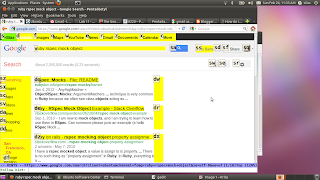
Other useful features are:
back/forward = shift+H / shift+L
page down/up = space bar / shift+space bar (these work without Pentadactyl)
half page down/up = ctrl + d / ctrl + u
search = / (yes, the slash key), then enter, then n/shift+N to search down/up
go to URL = o, space, [page url] (if you've entered something similar before, you can tab through the cached options)
go to URL in new tab = replace "o" in the above with "t"
open link in new tab: ;t , then it pops up hints as if you had pressed f but opens in a new window
However, you need to configure it a bit in order to get the most out of it. For example, as initially installed, it will remove your ability to use the familiar ctrl +c/v/a (for copy/paste/select all) due to its being based on the text editor Vim. Also, the hint keys (buttons used when creating a code that lets you click a click) are set by default to draw from the numbers 0-9, which are less comfortable to type every time you click on a link, and they are displayed too small to read.
To set your configurations, you need to create/edit a file called ".pentadactylrc" in your home directory. Here are the contents of mine, which fix the above problems:
Enjoy your breaking the tyranny of the mouse! (And yes, I composed this entire post, including creating the link, without using the mouse. I may have mentioned that a few times before).
For web browsing, the key is Pentadactyl, a Firefox extension that lets you do the things you want from the keyboard. (I would say all the things, but some websites are written so as to be unfriendly to it.) For example, if you want to click on a link, you hit f, and it pops up a keyboard code over every link, and you type the code to "click" on it. Here's what it looks like when you use it:

Other useful features are:
back/forward = shift+H / shift+L
page down/up = space bar / shift+space bar (these work without Pentadactyl)
half page down/up = ctrl + d / ctrl + u
search = / (yes, the slash key), then enter, then n/shift+N to search down/up
go to URL = o, space, [page url] (if you've entered something similar before, you can tab through the cached options)
go to URL in new tab = replace "o" in the above with "t"
open link in new tab: ;t , then it pops up hints as if you had pressed f but opens in a new window
However, you need to configure it a bit in order to get the most out of it. For example, as initially installed, it will remove your ability to use the familiar ctrl +c/v/a (for copy/paste/select all) due to its being based on the text editor Vim. Also, the hint keys (buttons used when creating a code that lets you click a click) are set by default to draw from the numbers 0-9, which are less comfortable to type every time you click on a link, and they are displayed too small to read.
To set your configurations, you need to create/edit a file called ".pentadactylrc" in your home directory. Here are the contents of mine, which fix the above problems:
"1.0rc1

loadplugins '.(js|penta)$'
group user
highlight Hint font: bold 10px "Droid Sans Mono", monospace !important; margin: -.2ex; padding: 0 0 0 1px; outline: 1px solid rgba(0, 0, 0, .5); background: rgba(255, 248, 231, .8); color: black; font-size: 14pt !important;
map -count -modes=i,n,v <C-c> <count><Pass>
map -count -modes=i,n,v <C-v> <count><Pass>
map -count -modes=i,n,v <C-a> <count><Pass>
map -count -modes=i <C-a> <Pass>
map -count -modes=i <C-x> <Pass>
set guioptions=bCrsmT
set hintkeys=asdfwervcxtgq
set hinttimeout=500

" vim: set ft=pentadactyl:
Enjoy your breaking the tyranny of the mouse! (And yes, I composed this entire post, including creating the link, without using the mouse. I may have mentioned that a few times before).
Wednesday, February 1, 2012
The secret unleased: I will become a software developer!
I know I've kept my readers kind of in the dark, but I just left my day job to attempt a career change into software development and otherwise make sense of all the projects out there that I could improve. I'll be flying to San Francisco today for it, where I'll stay for at least 2-3 months, residing on the luxurious (s)Nob Hill.
Here is the site for the "Developer bootcamp" program, for which I'll be in the Feb/March cohort.
Flight leaves at 1:30 pm, wish me luck!
Here is the site for the "Developer bootcamp" program, for which I'll be in the Feb/March cohort.
Flight leaves at 1:30 pm, wish me luck!
Wednesday, November 2, 2011
Virtualization is a riot!
Isn't it neat how computers can completely simulate other computers purely via software? (Background). Well, right now I'm reading a book that comes with a Linux Live CD containing relevant source code -- basically, a CD that you can boot from to see what it's like to use the operating system without interfering with the one you currently have. (Not to mention the benefit of having the exact same environment as the author so you can make sure It Works.) And that's how Live CDs are typically run: from bootup.
But with emulation, you don't need to reboot your whole computer just to get that Linux (or whatever OS) experience! You can set up a "sandbox" environment, or virtual machine that "pretends to be a computer". The software allocates a portion of your computing resources that you specify (disk space, RAM, etc.), and you just run the Live CD through that "pretend computer", freely switching from the window containing that virtual machine, to your web browser and whatnot. Again, it's without the hassle of rebooting every time you want to switch between that and the cute cat video you were watching.
So there I am -- I've got the virtual machine running a "sample" of an operating system off a Live CD, no need to reboot my "real" machine. But it gets better! I can go one step further and tell my pretend computer, "You know what? Let's go all the way. I want the full operating system -- not just the "sample" -- installed on your pretend hardware!" And then it dutifully runs through all the screens you would normally see when installing a Linux distro as your operating system, seizing control of the sandboxed software-that-thinks-it's-hardware, for a full wipe of the, um, non-OS you had there before.
Sorry, I don't know why ... I just find this all so hilarious ... virtualizing the use of a "sample" operating system before I install it on its virtual hardware.
(For those who are curious, the software I'm using is Oracle VM VirtualBox, available free for (IIUC) personal non-commercial use. I learned about it from LessWrong.com's failed attempts to teach others how to play with the site's code.)
But with emulation, you don't need to reboot your whole computer just to get that Linux (or whatever OS) experience! You can set up a "sandbox" environment, or virtual machine that "pretends to be a computer". The software allocates a portion of your computing resources that you specify (disk space, RAM, etc.), and you just run the Live CD through that "pretend computer", freely switching from the window containing that virtual machine, to your web browser and whatnot. Again, it's without the hassle of rebooting every time you want to switch between that and the cute cat video you were watching.
So there I am -- I've got the virtual machine running a "sample" of an operating system off a Live CD, no need to reboot my "real" machine. But it gets better! I can go one step further and tell my pretend computer, "You know what? Let's go all the way. I want the full operating system -- not just the "sample" -- installed on your pretend hardware!" And then it dutifully runs through all the screens you would normally see when installing a Linux distro as your operating system, seizing control of the sandboxed software-that-thinks-it's-hardware, for a full wipe of the, um, non-OS you had there before.
Sorry, I don't know why ... I just find this all so hilarious ... virtualizing the use of a "sample" operating system before I install it on its virtual hardware.
(For those who are curious, the software I'm using is Oracle VM VirtualBox, available free for (IIUC) personal non-commercial use. I learned about it from LessWrong.com's failed attempts to teach others how to play with the site's code.)
Sunday, February 15, 2009
Well, I took the plunge and installed Ubuntu (again)
Three years ago, I tried to install Ubuntu. Let's just say it went so badly that I'm not even going to give the details for fear that someone I chewed out at the time will notice the similarity between my case and "that jerk on the Ubuntu help site three years ago" and target me for reprisals.
Needless to say, it actually worked this time, since I was smart enough to install it on a completely different computer as a hedge against failure (instead of merely trying to isolate it to a partition on a secondary hard drive) and because the development crew has gotten its act together.
And I have to confess, I enjoy it for the most part. There's still a lot to get used to, and a lot of settings to configure, but I was amazed how easy it was to get wifi working, to install Firefox plugins (note how I don't snidely call it "liarsux" anymore?) and how many Free (yes, "they" want you to capitalize it), useful programs come bundled, and yet the system has no bloat ... everything is fast. Unlike on Windows, there isn't a huge list of processes of questionable purpose running that you can't shut down.
I've also gone back to using Vimperator which I had blogged about before, which means that yes, I made this post without ever using the mouse. But of course, like with most user interface design, the half-genius Herr Stubenschrott had to ruin his own code's functionality. Previously, you would hit the 'f' key and a bunch of key commands would pop up over the links like "ds". Then, hitting "ds" would activate the link. But now, they're all numerical, like "24", which makes it much less convenient.
Stubenschrott, in his defense, now permits you to call up a link by typing the first few letters of it, which I had suggested allowing before ... but it kind of defeats the purpose when the key commands blot out the first two letters! And the entire link becomes highlighted and impossible to read! Fortunately, someone wrote a script that converts it back to the old way.
All in all, a seamless, enjoyable transition so far. Now, to move over the old hard drives, files, and email...
Needless to say, it actually worked this time, since I was smart enough to install it on a completely different computer as a hedge against failure (instead of merely trying to isolate it to a partition on a secondary hard drive) and because the development crew has gotten its act together.
And I have to confess, I enjoy it for the most part. There's still a lot to get used to, and a lot of settings to configure, but I was amazed how easy it was to get wifi working, to install Firefox plugins (note how I don't snidely call it "liarsux" anymore?) and how many Free (yes, "they" want you to capitalize it), useful programs come bundled, and yet the system has no bloat ... everything is fast. Unlike on Windows, there isn't a huge list of processes of questionable purpose running that you can't shut down.
I've also gone back to using Vimperator which I had blogged about before, which means that yes, I made this post without ever using the mouse. But of course, like with most user interface design, the half-genius Herr Stubenschrott had to ruin his own code's functionality. Previously, you would hit the 'f' key and a bunch of key commands would pop up over the links like "ds". Then, hitting "ds" would activate the link. But now, they're all numerical, like "24", which makes it much less convenient.
Stubenschrott, in his defense, now permits you to call up a link by typing the first few letters of it, which I had suggested allowing before ... but it kind of defeats the purpose when the key commands blot out the first two letters! And the entire link becomes highlighted and impossible to read! Fortunately, someone wrote a script that converts it back to the old way.
All in all, a seamless, enjoyable transition so far. Now, to move over the old hard drives, files, and email...
Tuesday, July 8, 2008
The true problem with Amazon's one-click patent
Arnold Kling discusses the relative merit of software versus drug patents and brings up everyone's favorite, Amazon's one-click patent. He says that the difference between it and drug patents that makes one-click so objectionable, is that one click is obvious (you could come up with it in an afternoon, and so could anyone else).
I've said before that I think this misses the more fundamental objection: that it seems to patent the end, rather than the means. Buying something using just one click is the thing that is good, rather than the means of a achieving it. So by patenting it, you exclude any possible way of making a website such that one click causes something to be purchased. It is analagous to patenting "quick travel between two destinations" rather than "this specific machine that can get you between two destinations.
Of course, my greatest worry is that such basic interface enhancement is actually non-obvious to the typical software programmer or software interface designer. Heck, if I had a nickel for every time I banged my head on my keyboard due to interface problems, I could buy Amazon out!
I would have posted this comment on the blog I just linked except the they kinda won't let me. But expect to see a lot of ignorant comments about intellectual property there. It's just the nature of the beast.
I've said before that I think this misses the more fundamental objection: that it seems to patent the end, rather than the means. Buying something using just one click is the thing that is good, rather than the means of a achieving it. So by patenting it, you exclude any possible way of making a website such that one click causes something to be purchased. It is analagous to patenting "quick travel between two destinations" rather than "this specific machine that can get you between two destinations.
Of course, my greatest worry is that such basic interface enhancement is actually non-obvious to the typical software programmer or software interface designer. Heck, if I had a nickel for every time I banged my head on my keyboard due to interface problems, I could buy Amazon out!
I would have posted this comment on the blog I just linked except the they kinda won't let me. But expect to see a lot of ignorant comments about intellectual property there. It's just the nature of the beast.
Subscribe to:
Posts (Atom)